Ornament Classic Hot Air Balloon: Integrating High-Resolution Digital Assets into Your Holiday Design Workflow
In the modern creative landscape, the distinction between digital design and physical production has blurred. For professionals, hobbyists, and small business owners alike, the ability to seamlessly transition a concept from a screen to a tangible object is a critical skill. The Ornament Classic Hot Air Balloon collection represents more than just a set of festive images; it is a practical asset designed for integration into structured design workflows. Whether you are a marketer preparing seasonal brand materials, an educator creating classroom decorations, or an entrepreneur launching a holiday product line, understanding how to utilize high-resolution PNG files effectively can significantly enhance your output quality and efficiency.
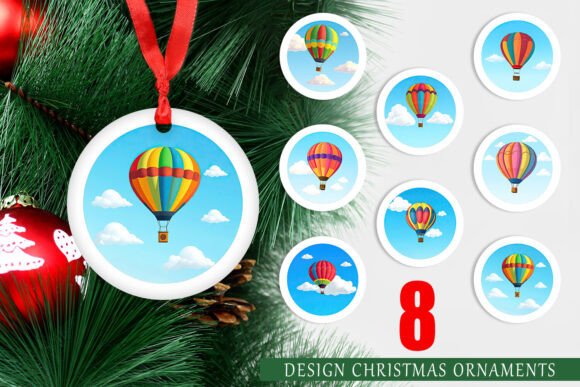
This article explores the practical application of this specific design set—comprising eight circular decorative designs at 300 dpi—and details how it fits into broader creative and operational processes. By focusing on preparation, compatibility, and execution, you can ensure that these digital assets serve their intended purpose without causing bottlenecks in your workflow.
Understanding the Asset Specifications and Quality Control
Before integrating any digital asset into a project, a thorough assessment of its technical specifications is necessary. The Ornament Classic Hot Air Balloon set is provided as eight individual PNG files, each measuring 5x5 inches at 1500x1500 pixels with a resolution of 300 dots per inch (dpi). These specifications are not arbitrary; they are chosen to meet the rigorous demands of high-quality printing.
For those unfamiliar with print standards, 300 dpi is the industry benchmark for crisp, professional-grade output. Lower resolutions, such as 72 dpi commonly found in web graphics, often result in pixelation or blurriness when printed on physical media. By providing files at 1500x1500 pixels, this set ensures that the intricate details of the hot air balloon illustrations remain sharp, whether they are printed on small ornament tags or larger decorative cards. This attention to technical detail reduces the need for post-processing upscaling, which can degrade image quality, thereby streamlining the pre-production phase of your project.
Furthermore, the use of the PNG format offers distinct advantages over JPEGs, particularly regarding transparency. While these specific designs are circular and likely intended to be used as full opaque elements, the PNG format preserves edge clarity without the compression artifacts common in JPEGs. This ensures that when you place these ornaments onto colored backgrounds or textured paper simulations in your design software, the edges remain clean and professional.
Pre-Production: Planning and Compatibility Checks
Successful implementation begins with planning. Before opening your design software, consider where the Ornament Classic Hot Air Balloon designs will fit within your broader holiday strategy. Are these intended for personal use, such as home decor, or for commercial applications, such as printable products on Etsy or Amazon KDP? The answer dictates your subsequent steps regarding licensing, file organization, and material selection.
Compatibility is another crucial factor. These files are universally compatible with major design platforms, including Adobe Photoshop, Illustrator, Canva, Procreate, and Affinity Designer. However, your workflow may vary depending on the tool. For instance, if you are using Canva, you can upload the PNGs directly into your media library. If you are working in Photoshop, you might organize the eight files into a single layered document to compare variations quickly. Establishing a consistent folder structure on your computer before beginning prevents time wasted searching for assets mid-project.
It is also essential to consider the end medium during this planning stage. Since these designs are optimized for printing on Christmas tree decorations, you should decide early on whether you will be using cardstock, glossy photo paper, or shrink plastic. Each material interacts differently with ink and light, which may influence minor adjustments to brightness or contrast in your digital file before printing.
Integration into Creative Workflows
Once the planning phase is complete, the integration of the Ornament Classic Hot Air Balloon assets into your creative process can begin. This stage is where the theoretical meets the practical. Here are several ways these assets can be utilized effectively across different professional and personal contexts:
- Product Development for Small Businesses: Entrepreneurs selling handmade goods can use these designs as the central visual element for printable ornaments. By combining the PNGs with typography or complementary patterns, you can create unique SKUs. The circular shape is ideal for die-cut stickers, coasters, or hanging tags. Ensure that your final export settings match the printer’s requirements to maintain color fidelity.
- Educational Resources: Educators can incorporate these balloons into holiday-themed learning activities. For example, they can be used as visual aids in storytelling sessions, as part of a counting exercise for younger students, or as templates for art projects. The high resolution allows for large-format printing if needed for classroom displays.
- Corporate Branding and Marketing: Marketers can use these neutral, classic designs to add a festive touch to email headers, social media posts, or internal company newsletters. Because the designs are classic rather than overly trendy, they align well with professional brand identities that require a subtle holiday nod without compromising corporate aesthetics.
- Personal Crafting and Scrapbooking: Hobbyists can integrate these images into scrapbook layouts, greeting cards, or gift tags. The consistency of the set allows for cohesive thematic designs across multiple items, enhancing the visual appeal of handmade gifts.
When working with these assets, maintain a non-destructive editing workflow. Keep the original PNG files untouched and work on copies or layers. This practice allows you to experiment with different color overlays, shadows, or backgrounds without risking the integrity of the source file. If you need to adjust the size, always scale down rather than up to preserve image sharpness.
Production and Physical Implementation
The transition from digital file to physical object is the most critical juncture in this workflow. Printing the Ornament Classic Hot Air Balloon designs requires attention to detail to ensure the final product matches your expectations. Start by conducting a test print. Print one or two designs on the chosen material to check for color accuracy, alignment, and cut lines.
If you are creating hanging ornaments, consider the method of attachment. Will you punch a hole at the top? If so, ensure that the design accounts for this by keeping critical visual elements away from the upper edge. Alternatively, you might choose to laminate the printed designs before cutting them out, which adds durability and a professional finish. Lamination also protects the ink from smudging, which is particularly important if the ornaments will be handled frequently or stored for future years.
Cutting precision is another key consideration. While the designs are circular, achieving a perfect circle by hand can be challenging. Using a circle punch, a cutting machine like a Cricut or Silhouette, or a precise rotary cutter can significantly improve the final appearance. If using a cutting machine, ensure that your SVG or cut file aligns perfectly with the printed PNG to avoid misalignment.
Long-Term Use and Asset Management
Effective workflow management extends beyond the immediate project. After completing your holiday decorations or products, take time to document what worked and what did not. Did the colors print true to screen? Was the 5x5 inch size appropriate for your intended use? These observations inform future projects and help refine your process.
Store the Ornament Classic Hot Air Balloon files in a dedicated digital archive. Tag them with relevant keywords such as "holiday," "printable," "high-resolution," and "ornament" to facilitate easy retrieval in future seasons. Many creators find value in building a library of reliable, high-quality assets that can be repurposed year after year. This approach not only saves time but also ensures consistency in your brand or personal style over time.
Additionally, consider how these assets might be adapted for other uses. Could the hot air balloon motif be resized for gift wrap labels? Could the color palette inspire a broader holiday marketing campaign? Thinking creatively about the versatility of your digital assets maximizes their value and return on investment.
Conclusion
The Ornament Classic Hot Air Balloon PNG set is a versatile tool for anyone looking to enhance their holiday projects with professional-grade visuals. By understanding the technical specifications, planning for compatibility, integrating the assets into a structured workflow, and paying attention to production details, you can achieve high-quality results efficiently. Whether you are a seasoned designer or a weekend crafter, treating digital assets with the same rigor as physical tools leads to better outcomes and a more enjoyable creative process. Embrace the precision and flexibility these files offer, and let them elevate your holiday preparations from mundane tasks to refined creative expressions.