Mastering Star Design in Laser Cut Style: A Guide to Decorative Craft Filigree and Vector Formats
In the world of modern crafting and digital fabrication, few motifs are as universally beloved as the star. From holiday ornaments to architectural accents, the star design in laser cut style has become a staple for makers, designers, and hobbyists alike. However, creating a truly stunning piece requires more than just picking a shape; it demands an understanding of decorative craft filigree, material constraints, and the technical nuances of vector files. Whether you are a beginner with a home desktop cutter or a seasoned professional running an industrial laser, mastering these elements is key to producing high-quality work.
This guide explores the intricacies of star-themed laser cutting, explaining why this design choice remains popular, how to prepare your files correctly, and what formats like EPS, JPG, SVG, and transparent PNG mean for your final product. By understanding the intersection of art and technology, you can elevate your projects from simple cutouts to intricate works of art.
The Appeal of Star Motifs in Laser Cutting
Stars are geometrically versatile. They can be simple five-pointed shapes or complex, multi-layered celestial bodies. In laser cutting, the star serves as an excellent canvas for demonstrating precision. The sharp points and symmetrical lines allow machines to showcase their accuracy, while the negative space between points offers opportunities for creative interpretation.
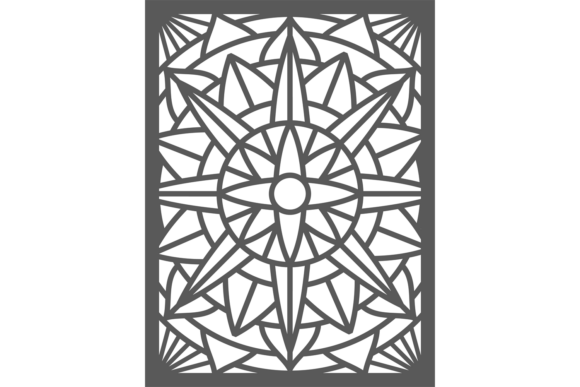
When we talk about star design in laser cut style, we are often referring to designs that leverage the unique capabilities of laser technology. Unlike traditional woodworking or metalworking, laser cutting allows for extreme detail without the need for physical tools to reach into tight corners. This makes it ideal for creating decorative craft filigree—delicate, ornamental work characterized by intricate patterns and open spaces.
Why Filigree Matters
Filigree is not just about aesthetics; it is about structural integrity and visual lightness. In laser cutting, filigree designs reduce the amount of material used, which can lower costs for expensive woods or acrylics. More importantly, filigree allows light to pass through the object. When a star design incorporates filigree elements, it transforms from a solid object into a play of light and shadow. This is particularly relevant for:
- Holiday Decorations: Christmas tree ornaments that catch the light.
- Lampshades: Projects where the laser-cut pattern casts ambient glow patterns on walls.
- Room Dividers: Large-scale installations that provide privacy without blocking light.
Understanding File Formats: EPS, SVG, JPG, and PNG
One of the most common hurdles for new laser cutters is file management. You may find a beautiful vector illustration online, but if it is in the wrong format, your machine cannot read it. Understanding the difference between raster and vector images is crucial for successful laser cutting.
Vector Formats: EPS and SVG
For laser cutting, vector files are the gold standard. A vector image uses mathematical paths to define shapes, meaning it can be scaled to any size without losing quality. The two most common vector formats you will encounter are EPS (Encapsulated PostScript) and SVG (Scalable Vector Graphics).
SVG is widely supported by modern laser software and is often the preferred format for hobbyists because it is lightweight and easy to edit in free programs like Inkscape. EPS is an older standard often used in professional graphic design workflows. Both formats allow the laser cutter to distinguish between "cut lines" and "engrave areas," which is essential for complex decorative craft filigree.
Raster Formats: JPG and Transparent PNG
Raster images, such as JPG and PNG, are made of pixels. While these are generally not suitable for cutting outlines, they have specific uses in laser crafting. A JPG might be used for photo engraving on wood, where the laser burns varying depths to create an image. However, JPGs do not support transparency, which can lead to unwanted white backgrounds being engraved.
This is where the transparent PNG becomes useful. If you are using a laser software that supports bitmap tracing, a transparent PNG allows you to isolate a design from its background easily. For example, if you download a star design in laser cut style as a PNG with a transparent background, you can trace the edges to create a vector path for cutting. Always ensure your PNG has high resolution to avoid jagged edges during the tracing process.
Design Principles for Successful Laser Cutting
Creating a file is one thing; ensuring it cuts correctly is another. When designing decorative craft filigree, you must account for the physical limitations of the laser beam and the material.
- Kerf Width: The laser beam burns away a small amount of material, known as the kerf. In intricate star designs, if lines are too close together, the material between them may burn away completely, causing the design to fall apart. Always leave enough bridge material between filigree elements.
- Point Sharpness: Extremely sharp points on a star can char or burn excessively. Rounding the tips slightly can result in a cleaner finish and prevent accidental ignition of thin materials.
- Material Grain: If you are cutting wood, the grain direction affects the strength of thin filigree parts. Aligning the design so that the grain runs parallel to the longest structural elements can prevent breakage.
Practical Applications in Modern Life and Business
The versatility of star design in laser cut style extends beyond hobbyist crafts. Small businesses and educators are increasingly leveraging these designs for practical and commercial purposes.
In education, laser-cut stars are used in STEM projects to teach geometry and symmetry. Students can assemble 3D stars from 2D planes, learning about spatial reasoning and engineering constraints. In business, customized laser-cut signage featuring star motifs is popular for retail displays, especially during festive seasons. The ability to quickly produce unique, high-end looking decor from affordable materials like plywood or MDF makes it a cost-effective marketing tool.
Furthermore, the rise of online marketplaces has created a demand for digital assets. Designers who create high-quality vector illustration EPS, JPG, SVG, transparent PNG packages can sell these files to other makers. This ecosystem supports a creative economy where digital files are as valuable as physical goods.
Common Misunderstandings and How to Avoid Them
A frequent assumption is that any image found online can be laser cut. This is rarely true. Many free images are low-resolution JPGs that will pixelate when scaled up. Always look for true vector files or high-resolution transparent PNGs intended for tracing. Another misconception is that thicker material is always better. For decorative craft filigree, thinner materials often yield more delicate and elegant results, provided the design is optimized for structural stability.
Additionally, some users believe that all laser cutters handle files the same way. In reality, software varies significantly. What works in LightBurn might need adjustment in Glowforge or RDWorks. Always test your star design in laser cut style on scrap material before committing to your final piece.
Conclusion
The star design in laser cut style represents a perfect blend of traditional symbolism and modern technology. By understanding the importance of decorative craft filigree and mastering the technical aspects of file formats like EPS, JPG, SVG, and transparent PNG, you can unlock endless creative possibilities. Whether you are creating a simple ornament or a complex architectural feature, the principles of precision, material awareness, and proper file preparation remain constant. As laser technology becomes more accessible, the ability to translate digital vectors into tangible art will continue to grow in value, offering both personal satisfaction and professional opportunity.